What Is a 3D Filament Printer and How Does It Work?
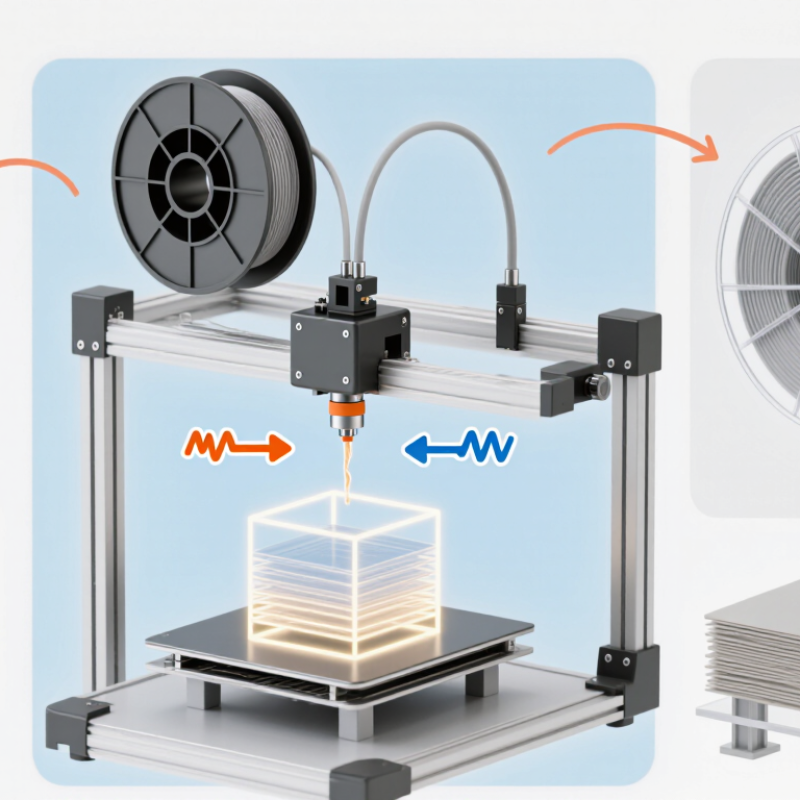
A 3D filament printer turns a digital design into a physical object, one thin layer at a time. It is also commonly called an FDM or FFF printer. A spool feeds thermoplastic filament into a heated nozzle, which melts the material and traces each layer across the build plate. The nozzle moves, the plastic cools, and the next layer begins. Simple in principle. Less simple in practice.
Adrian Bowyer, the engineer who launched the RepRap project, described its ambition as creating “a 3D printer that can print most of its own components.” That idea points to an important feature of filament printing: it makes objects by adding material, rather than cutting them from a block. Before printing, slicing software divides a 3D model into paths and instructions. The printer follows those instructions, controlling movement, temperature, and filament flow. Small choices matter. A draft near the printer, a poorly leveled bed, or damp filament can affect the result.
This guide explains what a 3D filament printer is, how its main parts work, and what happens from model to finished print. You will see why layer height changes surface detail, why supports may be needed beneath overhangs, and why a promising print can still warp at the corners. The process is practical, but not foolproof. A little patience helps.
What a 3D Filament Printer Is
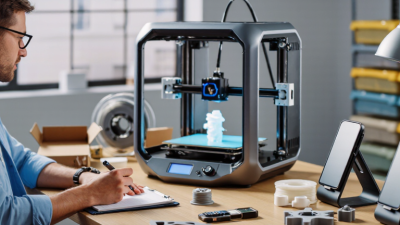
A 3D filament printer is a machine that builds solid objects by laying down melted plastic in thin layers. It is often called a fused-filament printer. A strand of thermoplastic, called filament, feeds from a spool into a heated nozzle. The nozzle softens the material and deposits it along a planned path. That is the basic idea.
A digital model is sliced into instructions that guide the nozzle and build platform. The printer follows those instructions, adding one layer after another until the shape forms. The material cools and hardens as it leaves the nozzle, bonding to the layer beneath it. Common parts include the frame, motors, nozzle, heated build surface, and filament feeder. In practice, the definition sounds simpler than setup can feel. A slightly uneven bed or damp filament may cause weak layers or rough edges. Even a small test print can reveal these issues. The finished object may need supports removed or surfaces smoothed, depending on its shape.
The Main Components and Their Functions
What Is a 3D Filament Printer and How Does It Work?
The Main Components and Their Functions
A 3D filament printer is a material-extrusion system. It feeds thermoplastic filament through a heated nozzle, laying down thin tracks that build an object layer by layer. ASTM/ISO 52900 classifies material extrusion as an additive manufacturing process.
Small parts matter. The frame keeps the printer aligned, while motors and belts move the print head or build plate along precise paths. A spool holder guides filament into the extruder, where gears grip and push it forward. If the grip slips, the printed line may become thin or uneven.
Inside the hot end, a heater melts the filament and a nozzle controls its flow. A cooling fan helps each deposited layer hold its shape. The build plate supports the object; heating it can reduce warping for some materials. Sensors and control electronics coordinate temperature and movement, but they cannot fix every setup problem.
Not glamorous. A dusty nozzle or loose belt can still spoil a long print. Wohlers Report 2024 estimated that global additive-manufacturing industry revenue reached $20.0 billion in 2023, an 11.1% increase from 2022. That growth reflects a broad industry, not a guarantee of print quality.
The practical lesson is easy to miss: careful calibration and material handling remain essential, even when the machine appears to be working normally.
How Filament Becomes a Three-Dimensional Object
A 3D filament printer turns a spool of thermoplastic into an object by placing material in thin, measured lines. A motor feeds the filament toward a heated nozzle, where it softens enough to flow. A slicing program converts a digital model into paths and layer instructions. The nozzle follows those paths above a build plate. It is a patient process.
The first layer matters most. The nozzle lays down a flattened bead that should grip the plate without being crushed. Then it traces the next outlines, filling selected areas with a planned pattern. The build plate or print head moves to make room for each new layer. Warm plastic cools and stiffens as the shape grows. Small shifts can show.
Temperature, speed, and airflow affect how cleanly the layers bond. Too much heat may leave fine strings between features; too little can make layers separate. A slight draft can also lift a corner from the plate. The finished surface usually shows faint layer lines, even on a carefully tuned print. That is normal, though not always desirable. Checking the first few layers can reveal trouble early, but it cannot guarantee a perfect result. The process is clever, yet a little imperfect—and that is worth remembering when judging a printed part.
What Is a 3D Filament Printer and How Does It Work? - How Filament Becomes a Three-Dimensional Object
| Dimension | What Happens | Typical Details |
|---|---|---|
| Printer type | A filament printer builds an object by melting and depositing thermoplastic material in successive layers. This process is commonly called fused filament fabrication (FFF). | The term fused deposition modeling (FDM) is also widely used for this method. |
| Digital model and slicing | Specialized software converts a 3D model into toolpaths that guide the printer’s nozzle, movement system, and material feed. | The resulting instruction file typically specifies layer height, print speed, temperatures, infill, and support structures. |
| Filament feed | Drive gears push solid filament from a spool through a feed tube or directly into the hot end. | Common filament diameters are 1.75 mm and 2.85 mm; the printer must be configured for the diameter it uses. |
| Heating and extrusion | The hot end softens the filament, and a small nozzle presses the material onto the build surface or onto previously printed layers. | A 0.4 mm nozzle is common. Nozzle temperature depends on the material and the filament maker’s guidance. |
| Layer formation | The nozzle traces the first layer, then moves upward by a small amount and deposits the next layer. The new material bonds to the layer below as it cools. | Layer heights around 0.1–0.3 mm are common, though the suitable range depends on the nozzle and printer setup. |
| Material: PLA | PLA is a commonly used thermoplastic for general-purpose prints and prototypes. | A typical nozzle-temperature range is about 190–220 °C. The recommended setting varies by formulation and printer. |
| Material: PETG | PETG is often selected when a print needs more toughness and heat resistance than a typical PLA print. | A typical nozzle-temperature range is about 220–250 °C. Bed temperature and cooling settings also affect results. |
| Material: ABS | ABS can produce durable parts, but it is more prone to warping as it cools than many common materials. | A typical nozzle-temperature range is about 230–260 °C. A heated bed and controlled airflow can help reduce warping. |
| Build plate and adhesion | The first layer must adhere to the build surface so the object stays in place throughout printing. | Bed temperature, surface condition, leveling, and the material all influence adhesion; settings are not universal. |
| Supports and infill | Temporary supports can hold up overhanging features, while infill provides internal structure without making every part fully solid. | The slicer determines support placement and infill pattern and density based on the model and intended use. |
| Cooling and completion | After deposition, the plastic cools and solidifies. Once printing is complete and the part has cooled, it can be removed and supports can be cleaned away. | Cooling needs differ by material; excessive or insufficient cooling can affect layer bonding, surface finish, and shape. |
Note: Temperature ranges and other settings are typical examples, not universal specifications. Follow the filament manufacturer’s recommendations and calibrate settings for the printer, material, and part.
Key Settings That Affect the Printing Process
A 3D filament printer builds an object by feeding plastic through a heated nozzle, laying down one thin path at a time. Small setting changes can affect whether those paths bond, curl, or land accurately. The right values depend on the filament, nozzle, room temperature, and shape being printed. There is no single profile that works for every job.
Nozzle temperature controls how easily the filament flows and sticks to the layer below. If it is too low, paths may look rough or separate; too high, and fine details can soften. Bed temperature helps the first layer grip the build surface. Watch its edges: if they lift, check the bed level and temperature before changing several settings at once. Slow down the first layer. It matters.
Layer height affects both detail and print time. A thinner layer can show curved surfaces more smoothly, but it adds many passes. Print speed also matters: fast movement may leave ringing near sharp corners or gaps between lines. Cooling helps solidify small features, though too much airflow can weaken layer bonding on some materials. These effects can overlap, which makes troubleshooting less tidy than a settings chart suggests.
Retraction reduces the thread-like hairs left as the nozzle travels between areas. Too much can cause inconsistent extrusion, so adjust it in small steps. Keep filament dry; damp material may pop softly at the nozzle and leave a pitted surface. Change one setting at a time and inspect a simple test print. I still find that patience is easier to recommend than to practice.
Common Filaments and Their Typical Uses
A 3D filament printer melts a plastic strand and lays it down in thin layers. The filament you choose affects strength, flexibility, surface finish, and print difficulty. PLA is common for prototypes, desk organizers, and decorative parts. It prints with little warping, but heat can soften it. Not ideal for hot car interiors.
PETG suits brackets, storage bins, and parts that need more impact resistance. ABS is used for tougher housings, though it can warp and benefits from a ventilated workspace. ASA offers similar practical durability and better outdoor weather resistance. TPU bends instead of snapping, making it useful for grips, feet, and flexible covers. Nylon handles wear well in moving parts, but moisture can complicate printing. Dry filament matters.
Material choice is not just a strength contest. A thin PETG hook may flex; a thick PLA part may still crack under repeated stress. The Wohlers Report 2024 estimated that the global additive manufacturing industry generated $20.035 billion in 2023, up 11.1 percent from 2022. That figure covers the wider industry, not filament sales alone, but it shows how broadly these production methods are being adopted. Test a small sample under real conditions before relying on a printed part. Labels simplify things. Real use is messier.
What Is a 3D Filament Printer and How Does It Work?
Common filaments and their typical nozzle temperature ranges
A filament printer feeds thermoplastic through a heated nozzle and deposits it layer by layer. PLA is commonly used for prototypes and decorative parts; PETG for functional parts; ABS for heat-resistant parts; TPU for flexible parts; and Nylon for tough, wear-resistant components. Temperature ranges are typical starting points and vary by filament formulation and printer, so check the material specifications.